> ## Documentation Index
> Fetch the complete documentation index at: https://www.vobiz.ai/docs/llms.txt
> Use this file to discover all available pages before exploring further.
# HubSpot integration
> Put a Vobiz softphone inside HubSpot - call from a contact record, talk in the browser, and let HubSpot log the call against the contact automatically.
Agents call from a HubSpot contact record, talk in the browser, and HubSpot writes the call onto that contact by itself.
**Source code:** [vobiz-ai/Vobiz-HubSpot-Calling](https://github.com/vobiz-ai/Vobiz-HubSpot-Calling) — the widget, the Node backend, and the scripts that register the calling extension with HubSpot.
**Scope:** inbound and outbound, with browser audio over WebRTC. HubSpot creates the call engagement itself from the widget's SDK messages, using the **agent's own session** — so the app needs no CRM scopes and the backend never writes to HubSpot.
## What you get
| | |
| - | - |
| **Call from a record** | Dial from a contact and the call is logged against it |
| **Automatic engagement** | HubSpot creates the call engagement from `cti.callCompleted` |
| **Inbound screen pop** | An incoming call raises an Answer / Decline overlay in the tab |
| **Recordings** | Playable from the widget, behind an expiring signed link that carries no credentials |
| **Browser audio** | Calls run over WebRTC in the tab — no desk phone, no desktop app |
| **No CRM scopes** | The backend never writes to HubSpot, so the app asks for none |
## How it works
The one thing to understand first: **the browser is the A leg.** The widget sends the SIP INVITE itself, and the backend answers `` to reach the customer.
```text theme={null}
widget ──SIP INVITE──▶ Vobiz ──answer_url──▶ backend /answer
│
──▶ customer
```
**The intuitive design does not work.** Originating to the customer over the REST API and then bridging the agent in with `` is blocked platform-side: Vobiz builds a gateway URI it cannot itself parse and drops its own INVITE (`tr_eval_uri(): invalid uri`, `blocking gw`). The customer answers, hears ringback, then *"the agent could not be reached"*.
Inbound is the exception — `` is the only way to reach a registered endpoint, and it works.
| Piece | Role |
| - | - |
| `source/` | The widget HubSpot iframes — SIP stack, dialpad, and the Calling Extensions SDK calls |
| `backend/server.js` | Answers Vobiz webhooks, serves the widget, holds credentials, brokers the Vobiz REST API |
| `backend/hubspot-oauth.js` | HubSpot OAuth — install, callback, refresh |
| `scripts/configure-calling.js` | Registers the widget with HubSpot and enables inbound |
## Requirements
| Requirement | Detail |
| - | - |
| Vobiz account | `AUTH_ID`, `AUTH_TOKEN`, a DID, and balance — [console.vobiz.ai](https://console.vobiz.ai) |
| HubSpot account | With developer tools access — gated separately from the CRM |
| Public HTTPS URL | `cloudflared` or ngrok. Vobiz must reach `/answer`, `/dial-status` and `/recording-ready` |
| Runtime | Node 18+ |
## Step 1: Prove the Vobiz account
Place a call with [rtc-demo.vobiz.ai](https://rtc-demo.vobiz.ai/) before anything else. If that fails, nothing here will work and you will spend a day debugging the wrong layer.
## Step 2: Create the SIP endpoint
```bash theme={null}
curl -X POST "https://api.vobiz.ai/api/v1/Account/$AUTH_ID/Endpoint/" \
-H "X-Auth-ID: $AUTH_ID" -H "X-Auth-Token: $AUTH_TOKEN" \
-H "Content-Type: application/json" \
-d '{"username":"hsagent","password":"","alias":"HubSpot Agent"}'
```
**Vobiz rewrites the username you submit.** Send `hsagent` and the stored username comes back as something like `hsagent1187694299145202883643`. Read the stored `username` out of the response — that is what registers, and what `VOBIZ_SIP_USER` must contain. Registering the name you chose fails in a way that looks like bad credentials.
**Use a separate endpoint per integration.** An endpoint binds to exactly one Vobiz application at a time, so sharing one between HubSpot and another CRM silently breaks whichever was configured first.
## Step 3: Run the backend
```bash theme={null}
cp backend/.env.example backend/.env # then fill it in
npm install
npx webpack # build the widget bundle
npm start # :8092
cloudflared tunnel --url http://localhost:8092
```
Put the tunnel URL in `PUBLIC_BASE` and restart. Then **check the answer URL before touching any UI**:
```bash theme={null}
curl -s -X POST "$PUBLIC_BASE/answer" \
-d "From=sip:x@registrar.vobiz.ai&To=91XXXXXXXXXX&RouteType=sip"
```
It must return `` containing ``. A dead answer URL produces the exact symptom people blame on registration: the customer answers, hears ringback, then *"the agent could not be reached"*.
## Step 4: Point Vobiz at the backend
With the widget signed in, one call does all three steps — creates the application, binds the endpoint, attaches the DID:
```bash theme={null}
curl -X POST "$PUBLIC_BASE/setup-inbound" \
-H 'Content-Type: application/json' -d '{"agentId":"test-agent"}'
```
Two undocumented platform behaviours it works around:
* The endpoint-binding field is **`app_id`**, not the documented `application`, which is silently ignored and still returns `202 "changed"`.
* DID attachment is `POST /numbers/%2B/application` with `{"application_id": …}`. The `+` must be percent-encoded, and `/Number/` returns a bare `401 Unauthorised` that reads exactly like a credentials problem and is not one.
## Step 5: Sign in and call
Open the widget in HubSpot. It opens on a **CONNECTING** badge while the SIP stack registers.
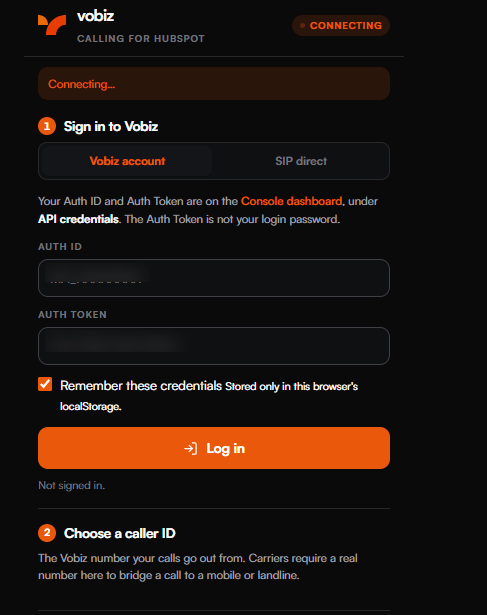 Sign in with the **Auth ID and Auth Token** from the [console](https://console.vobiz.ai) under **API credentials** — the Auth Token is not your login password. The badge turns green and the widget reports the registered agent.
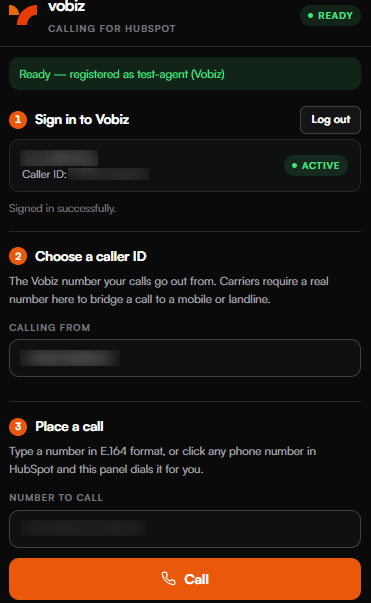 The **SIP direct** tab signs in with SIP credentials instead, for deployments that do not hand the widget a Vobiz account login.
### Choose a caller ID
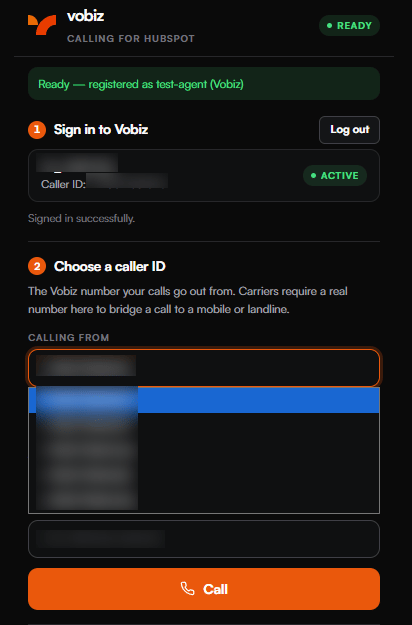
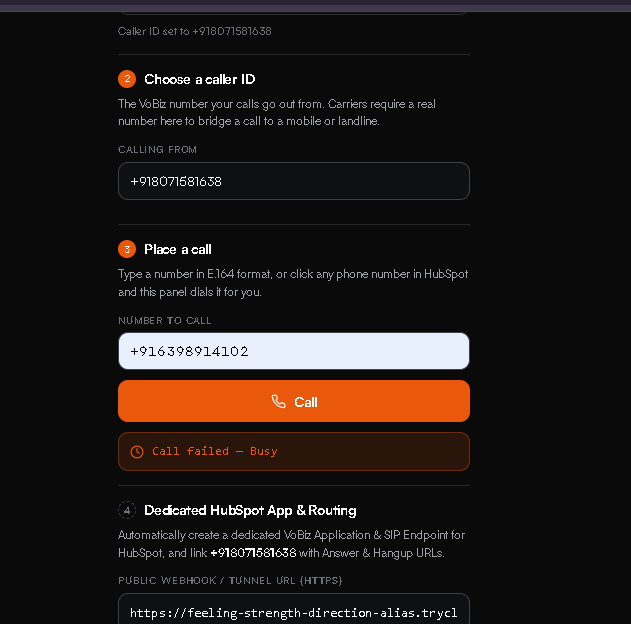
**Calling from** lists the numbers on the account. Carriers require a real number here to bridge a call to a mobile or landline.
The **SIP direct** tab signs in with SIP credentials instead, for deployments that do not hand the widget a Vobiz account login.
### Choose a caller ID
**Calling from** lists the numbers on the account. Carriers require a real number here to bridge a call to a mobile or landline.
 ### Place the call
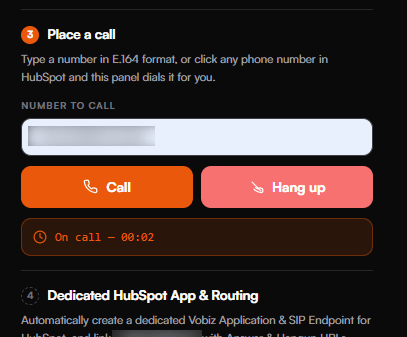
Type a number in E.164 format, or click any phone number in HubSpot and the panel dials it.
### Place the call
Type a number in E.164 format, or click any phone number in HubSpot and the panel dials it.
 Once connected the widget swaps **Call** for **Hang up** and runs a timer.
 ## Inbound calls
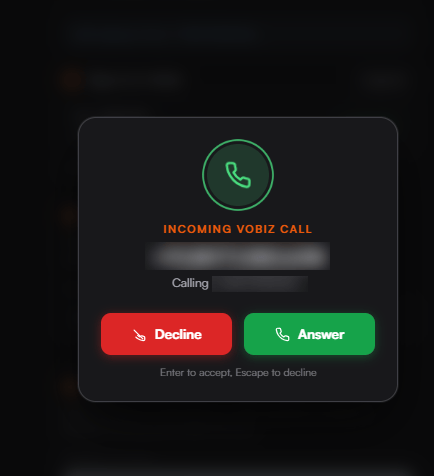
A call to the attached DID raises an overlay over HubSpot. **Enter** accepts, **Escape** declines.
## Inbound calls
A call to the attached DID raises an overlay over HubSpot. **Enter** accepts, **Escape** declines.
 ## Recordings
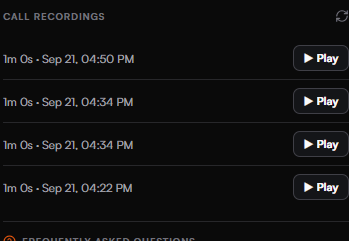
Completed calls appear under **Call recordings** with their duration and timestamp. **Play** opens an inline audio player.
## Recordings
Completed calls appear under **Call recordings** with their duration and timestamp. **Play** opens an inline audio player.
 Playback links are **HMAC-signed with a short expiry and carry no credentials**. An earlier build took a caller-supplied `url` and fetched it with the account's Vobiz credentials attached — a credential-exfiltration primitive any web page could drive. Never reintroduce a caller-supplied URL here.
## Provisioning a dedicated app and number
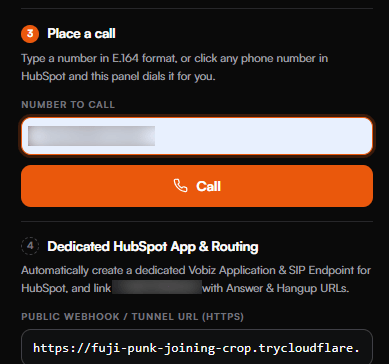
Rather than wiring the application by hand, the widget can create a dedicated Vobiz application and SIP endpoint for HubSpot and link a number to it, with the answer and hangup URLs already set.
Playback links are **HMAC-signed with a short expiry and carry no credentials**. An earlier build took a caller-supplied `url` and fetched it with the account's Vobiz credentials attached — a credential-exfiltration primitive any web page could drive. Never reintroduce a caller-supplied URL here.
## Provisioning a dedicated app and number
Rather than wiring the application by hand, the widget can create a dedicated Vobiz application and SIP endpoint for HubSpot and link a number to it, with the answer and hangup URLs already set.
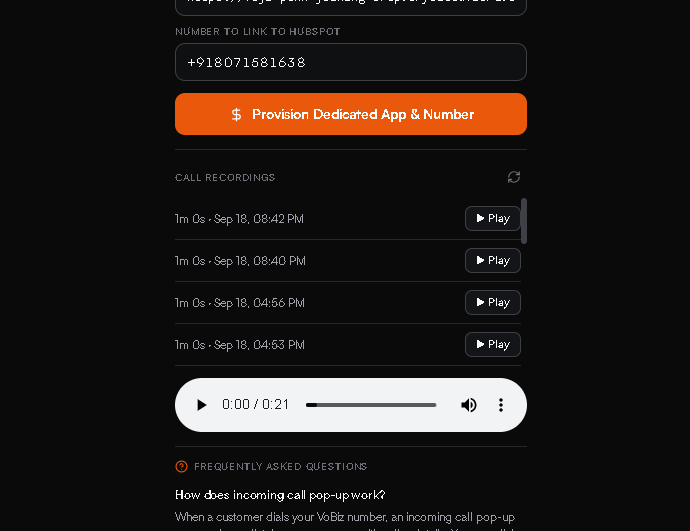 Paste the public tunnel URL into **Public webhook / tunnel URL (HTTPS)**, put the DID in **Number to link to HubSpot**, and provision.
## How a call reaches the CRM
HubSpot creates the engagement itself, from the SDK messages the widget sends — `cti.outgoingCall`, `cti.incomingCall` and `cti.callCompleted` — using the agent's own session.
This is why the app needs **no CRM scopes** and why `hubspotFetch` in `backend/hubspot-oauth.js` has no callers. If server-side CRM writes are ever added, both the scopes and the install permissions change.
## Backend routes
| Route | Role |
| - | - |
| `GET/POST /answer`, `/inbound-answer` | The XML Vobiz executes. Branches on direction |
| `POST /dial-status` | The `action` target of `` — reports how the call ended |
| `POST /recording-ready` | `` — fires when the file is downloadable |
| `POST /start-call` | The widget's click-to-dial entry point |
| `POST /login`, `/login-sip`, `/logout` | Session handling; exchanges the Auth Token for an opaque session token |
| `POST /select-number` | Sets the outbound caller ID |
| `POST /setup-inbound` | Creates the application, binds the endpoint, attaches the DID |
| `POST /provision-hubspot-dedicated` | Provisions a dedicated application, endpoint and number |
| `GET /hubspot/install`, `/hubspot/callback`, `/hubspot/status` | HubSpot OAuth |
| `GET /widget` | Serves the widget bundle |
| `GET /health` | Resolved configuration |
## The answer XML
```xml theme={null}
91XXXXXXXXXX
```
| Detail | Why it matters |
| - | - |
| `` is a **sibling before** ``, self-closing | FreeSWITCH rejects the nested form and the caller hears a bogus *Busy* |
| `action` + `redirect="false"` | Without both, Vobiz re-fetches the answer URL when `` ends and re-executes the document — one call dials the customer over and over |
| `callerId` on inbound | Omit it and Vobiz derives it from the A leg, which on an inbound call is the *caller's* number. B-leg creation is then refused silently |
| `Event=Hangup` guard | A hangup notification is not a request for instructions. Returning `` hands Vobiz a fresh leg after the call already ended |
## Troubleshooting
| Symptom | Cause | Resolution |
| - | - | - |
| Customer answers, hears ringback, then *"the agent could not be reached"* | The answer URL is dead or stale | `curl` it as in Step 3 — it must return `` |
| No `WEBHOOK /answer` line at all | The endpoint is not bound to the application, or `PUBLIC_BASE` is stale | Re-run `/setup-inbound` |
| *"Registration failed"* | `VOBIZ_SIP_USER` holds the name you submitted, not the one Vobiz stored | Read the stored `username` out of the endpoint response |
| Call connects but the CDR bills `0s` | SDP/ICE — missing STUN candidates | Check `pcConfig.iceServers` is set |
| No CDR at all, opaque *SIP Failure Code* | Session timers | `session_timers: false` is mandatory |
| One call dials the customer repeatedly | `` has no `action`, or `redirect="false"` is missing | Add both |
| Calls stop after a tunnel restart | A quick tunnel gets a new hostname, and `PUBLIC_BASE`, the Vobiz `answer_url`, `permittedUrls.iframe` and the widget URL all go stale together | Use a stable hostname |
| Call fails immediately as *Busy* | Often the nested `` form rather than a real busy | Make `` a sibling before `` |
Paste the public tunnel URL into **Public webhook / tunnel URL (HTTPS)**, put the DID in **Number to link to HubSpot**, and provision.
## How a call reaches the CRM
HubSpot creates the engagement itself, from the SDK messages the widget sends — `cti.outgoingCall`, `cti.incomingCall` and `cti.callCompleted` — using the agent's own session.
This is why the app needs **no CRM scopes** and why `hubspotFetch` in `backend/hubspot-oauth.js` has no callers. If server-side CRM writes are ever added, both the scopes and the install permissions change.
## Backend routes
| Route | Role |
| - | - |
| `GET/POST /answer`, `/inbound-answer` | The XML Vobiz executes. Branches on direction |
| `POST /dial-status` | The `action` target of `` — reports how the call ended |
| `POST /recording-ready` | `` — fires when the file is downloadable |
| `POST /start-call` | The widget's click-to-dial entry point |
| `POST /login`, `/login-sip`, `/logout` | Session handling; exchanges the Auth Token for an opaque session token |
| `POST /select-number` | Sets the outbound caller ID |
| `POST /setup-inbound` | Creates the application, binds the endpoint, attaches the DID |
| `POST /provision-hubspot-dedicated` | Provisions a dedicated application, endpoint and number |
| `GET /hubspot/install`, `/hubspot/callback`, `/hubspot/status` | HubSpot OAuth |
| `GET /widget` | Serves the widget bundle |
| `GET /health` | Resolved configuration |
## The answer XML
```xml theme={null}
91XXXXXXXXXX
```
| Detail | Why it matters |
| - | - |
| `` is a **sibling before** ``, self-closing | FreeSWITCH rejects the nested form and the caller hears a bogus *Busy* |
| `action` + `redirect="false"` | Without both, Vobiz re-fetches the answer URL when `` ends and re-executes the document — one call dials the customer over and over |
| `callerId` on inbound | Omit it and Vobiz derives it from the A leg, which on an inbound call is the *caller's* number. B-leg creation is then refused silently |
| `Event=Hangup` guard | A hangup notification is not a request for instructions. Returning `` hands Vobiz a fresh leg after the call already ended |
## Troubleshooting
| Symptom | Cause | Resolution |
| - | - | - |
| Customer answers, hears ringback, then *"the agent could not be reached"* | The answer URL is dead or stale | `curl` it as in Step 3 — it must return `` |
| No `WEBHOOK /answer` line at all | The endpoint is not bound to the application, or `PUBLIC_BASE` is stale | Re-run `/setup-inbound` |
| *"Registration failed"* | `VOBIZ_SIP_USER` holds the name you submitted, not the one Vobiz stored | Read the stored `username` out of the endpoint response |
| Call connects but the CDR bills `0s` | SDP/ICE — missing STUN candidates | Check `pcConfig.iceServers` is set |
| No CDR at all, opaque *SIP Failure Code* | Session timers | `session_timers: false` is mandatory |
| One call dials the customer repeatedly | `` has no `action`, or `redirect="false"` is missing | Add both |
| Calls stop after a tunnel restart | A quick tunnel gets a new hostname, and `PUBLIC_BASE`, the Vobiz `answer_url`, `permittedUrls.iframe` and the widget URL all go stale together | Use a stable hostname |
| Call fails immediately as *Busy* | Often the nested `` form rather than a real busy | Make `` a sibling before `` |
 **`DialBLegUUID` is the single most useful field in this stack.** Present means the call connected; empty means no B leg was ever created, whatever the UI showed. It is logged on every `/dial-status` line.
Ignore the Endpoint API's `sip_registered` — it reads `"false"` even when registration genuinely succeeded, on every endpoint on the account. The widget gates on JsSIP's `registered` event instead.
## Known limits
* **The backend is single-account.** It is bound to one Vobiz account through `.env`, and every agent who signs in shares one SIP endpoint. Two agents on one install register as the same endpoint and race for calls. `agentId` is self-asserted — it selects a label, not an identity.
* **Marketplace distribution is not set up.** `distribution` is `private`; switching to `marketplace` needs listing assets that do not exist yet.
* **`agents.example.json` is vestigial.** SIP credentials come from `.env`; nothing reads that file for routing.
## Next steps
* Clone the app: [vobiz-ai/Vobiz-HubSpot-Calling](https://github.com/vobiz-ai/Vobiz-HubSpot-Calling)
* The same softphone in other CRMs: [Zendesk](/docs/integrations/zendesk), [Pipedrive](/docs/integrations/pipedrive), [Freshdesk](/docs/integrations/freshdesk)
* Reference: [``](/docs/xml/dial), [``](/docs/xml/record), [SIP endpoints](/docs/endpoint/endpoint-object), [CDRs](/docs/cdr/get-cdr)
This documentation is built and hosted on [Mintlify](https://mintlify.com), a developer documentation platform.
**`DialBLegUUID` is the single most useful field in this stack.** Present means the call connected; empty means no B leg was ever created, whatever the UI showed. It is logged on every `/dial-status` line.
Ignore the Endpoint API's `sip_registered` — it reads `"false"` even when registration genuinely succeeded, on every endpoint on the account. The widget gates on JsSIP's `registered` event instead.
## Known limits
* **The backend is single-account.** It is bound to one Vobiz account through `.env`, and every agent who signs in shares one SIP endpoint. Two agents on one install register as the same endpoint and race for calls. `agentId` is self-asserted — it selects a label, not an identity.
* **Marketplace distribution is not set up.** `distribution` is `private`; switching to `marketplace` needs listing assets that do not exist yet.
* **`agents.example.json` is vestigial.** SIP credentials come from `.env`; nothing reads that file for routing.
## Next steps
* Clone the app: [vobiz-ai/Vobiz-HubSpot-Calling](https://github.com/vobiz-ai/Vobiz-HubSpot-Calling)
* The same softphone in other CRMs: [Zendesk](/docs/integrations/zendesk), [Pipedrive](/docs/integrations/pipedrive), [Freshdesk](/docs/integrations/freshdesk)
* Reference: [``](/docs/xml/dial), [``](/docs/xml/record), [SIP endpoints](/docs/endpoint/endpoint-object), [CDRs](/docs/cdr/get-cdr)
This documentation is built and hosted on [Mintlify](https://mintlify.com), a developer documentation platform.